What Is an AI Writing Assistant? Uses, Benefits, and Limits
Learn what an AI writing assistant does, where it helps, where it fails, and how to use one responsibly for clearer, more reliable writing today.

An AI writing assistant is software that helps you plan, draft, rewrite, edit, summarize, and polish text with artificial intelligence. In practice, I think of it less as a magic writer and more as a patient writing partner: it can suggest ideas, fix awkward phrasing, change tone, turn notes into a draft, and review finished writing before you publish or send it.
The important word is assistant.
Used well, it acts like a fast drafting partner, proofreader, and second set of editorial eyes. Used badly, it becomes a shortcut that produces confident but generic writing, invented details, weak arguments, and a voice that sounds like every other AI-generated page online.
If you want to test the workflow directly, the WritingTools.ai AI writing assistant is built for drafting, rewriting, and polishing without jumping between separate tools.
TL;DR
| Question | Short answer |
|---|---|
| What is an AI writing assistant? | A tool that uses AI to help with brainstorming, drafting, rewriting, editing, summarizing, and tone improvement. |
| What is it best for? | Getting unstuck, improving rough text, creating first drafts from your notes, checking clarity, and generating options. |
| What is it bad at? | Verifying facts, making original arguments from nothing, understanding private context, and knowing when a claim is too risky. |
| Can it replace a writer? | Not for serious work. It can speed up parts of writing, but a human still owns the idea, accuracy, judgment, and final voice. |
| How do you get better output? | Give the tool a clear reader, purpose, source material, tone, examples, constraints, and a specific task. |
What an AI writing assistant actually does
Most people first try an AI writing assistant by asking it to "write something." That is the least interesting use.
The better use is to bring it into the writing process at the points where humans usually slow down: turning messy notes into structure, finding cleaner wording, testing whether the argument flows, or changing a paragraph from stiff to readable. That is where I have seen these tools earn their keep. Not by replacing the thinking, but by reducing the friction around the thinking.
Here is the practical difference:
| Writing stage | What the assistant can do | What you still need to do |
|---|---|---|
| Before writing | Brainstorm angles, narrow a topic, summarize notes, suggest outlines, list objections. | Decide the real point and choose what is worth saying. |
| Drafting | Turn notes into a first draft, write section options, create examples, suggest transitions. | Add lived context, verify facts, remove generic claims, and decide what stays. |
| Rewriting | Shorten, expand, simplify, change tone, paraphrase, or reorganize unclear paragraphs. | Protect meaning and make sure the revised version still sounds like you. |
| Editing | Check grammar, clarity, flow, repetition, tone, missing context, and weak openings. | Make final editorial calls and catch problems the tool missed. |
| Publishing | Suggest titles, meta descriptions, summaries, social posts, and repurposed versions. | Match each version to the real audience and platform. |
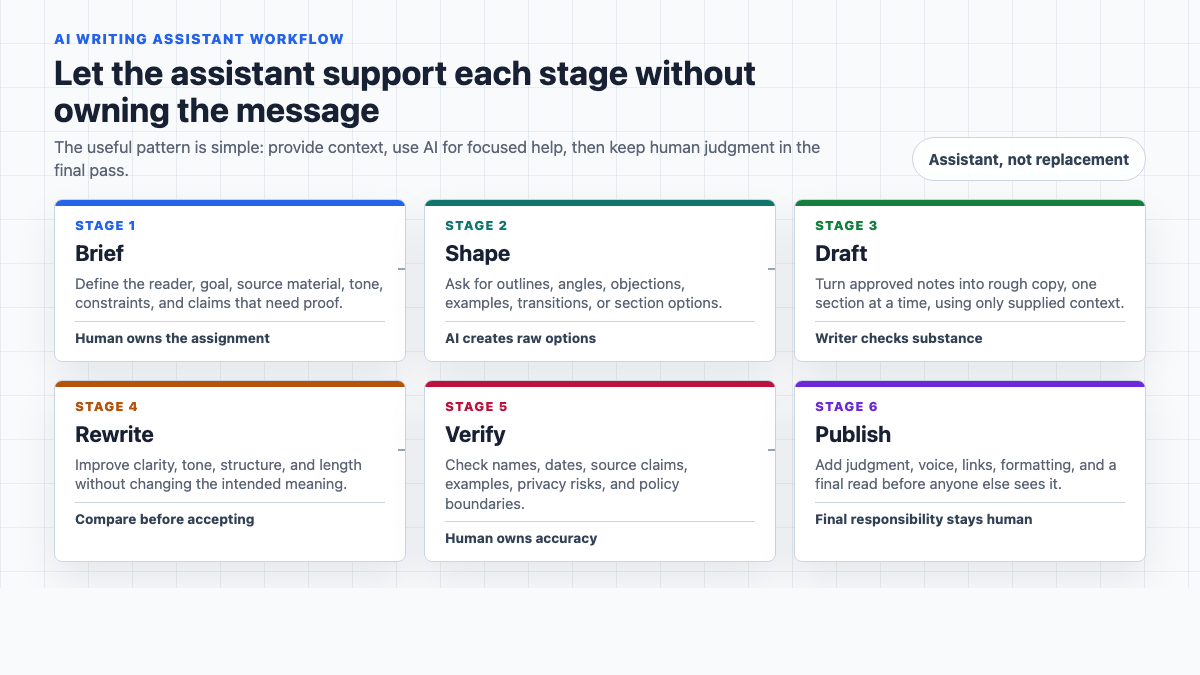
That is why I prefer thinking of these tools as writing support, not writing replacement. The assistant can generate language quickly. It cannot know by itself whether the language is true, useful, appropriate, or strategically right. That final judgment still belongs to the writer.
How AI writing assistants work
Most modern AI writing assistants use large language models. In plain English, that means the tool predicts and generates text based on patterns in language, the prompt you give it, and the context available in the conversation or document.
This is why the same tool can produce a weak answer from a weak prompt and a much better answer from a detailed one.
A vague prompt gives the assistant almost nothing to work with:
Write a blog introduction about productivity.
A better prompt gives it a reader, purpose, point of view, tone, and boundaries:
Write a short blog introduction for freelancers who feel busy but not productive. Use a direct, practical tone. Avoid hype. Make the main point that productivity starts with choosing fewer priorities, not adding more apps.
The second prompt still needs review, but it has a real editorial direction. In my experience, that is the difference between asking AI to guess and asking it to help with a specific writing job.
Common AI writing assistant features
Different tools package the features differently, but most useful AI writing assistants cover some mix of these jobs. The feature list matters less than the workflow: a tool with ten average features can be less useful than one that handles two recurring writing problems cleanly.
| Feature | What it helps with | Where to be careful |
|---|---|---|
| Draft generation | Creating a first pass from notes, briefs, prompts, or outlines. | Full drafts can sound polished before the thinking is strong. |
| Rewriting | Making text clearer, shorter, more natural, more formal, or more persuasive. | Rewrites can quietly change meaning if you do not compare the versions. |
| Grammar and spelling checks | Catching surface errors, punctuation issues, and awkward grammar. | Automated corrections can flatten style or miss context-specific choices. |
| Tone adjustment | Changing a draft for a customer, teacher, editor, executive, or casual reader. | "Professional" often becomes bland unless you define the tone more precisely. |
| Summarization | Condensing research, meeting notes, transcripts, articles, or long drafts. | Summaries can omit caveats or overstate certainty. |
| Brainstorming | Generating titles, angles, examples, objections, analogies, or outlines. | Brainstormed ideas are raw material, not a strategy. |
| Citation and source support | Formatting references or helping organize source notes. | The assistant may invent citations unless you provide real sources. Use a citation generator only after you have verified the source itself. |
| Plagiarism and originality checks | Spotting copied phrasing or too-close paraphrases. | A detector is a warning signal, not a legal or academic verdict. |
Large productivity-suite writing resources often frame the category broadly, including spelling, grammar, tone, summarization, brainstorming, SEO, translation, voice-to-text, and app compatibility. That breadth is useful, but it also explains why the term can feel fuzzy: an "AI writing assistant" may be a grammar tool, a chatbot, a document editor, a content workflow tool, or all of those at once.
Where AI writing assistants help most
AI writing assistants are most useful when you already have direction but need help shaping the words.
Turning notes into a draft
This is one of the strongest use cases. Instead of asking the assistant to invent an article from a title, give it your notes, source bullets, examples, audience, and outline. Then ask it to turn that material into a rough draft.
That draft will still need editing. But it usually starts closer to your intent because the raw material came from you. I would rather edit an imperfect draft built from real notes than a smooth draft built from the assistant's assumptions.
For long-form work, I would pair this with a defined process rather than treating each prompt as a one-off request. A repeatable AI writing workflow makes the assistant more useful because it separates research, outlining, drafting, editing, and final review.
Rewriting unclear or stiff sections
Sometimes the idea is right but the paragraph is hard to read. An AI assistant can quickly produce cleaner versions:
Rewrite this paragraph in plain English without changing the meaning.
Make this email warmer, but keep it concise and professional.
Shorten this explanation for a beginner audience.
This is where a paraphrasing tool can help, especially when you want several alternatives before choosing the best line manually.
Editing for tone and readability
AI is useful as a second pass when the draft technically says the right thing but sounds off. This is often where the smallest prompts do the most work.
You can ask:
Where does this sound too formal?
Which sentences are vague?
What would a skeptical reader question here?
Does this page sound like it was written for beginners or experts?
I like this use because it keeps the writer in control. The tool provides feedback, options, and pressure tests. You decide what to change.
For a quick final cleanup, a grammar checker is useful, but I would still read the final draft manually. Grammar tools often catch the easy mistakes and miss the sentence that is technically correct but confusing.
Summarizing source material
Summarization is helpful when you are working through long research notes, transcripts, meeting notes, or background articles.
The safest way to use it is to ask for structured summaries:
Summarize this source into key points, claims, statistics, caveats, and questions I should verify.
That is more useful than a generic summary because it separates usable facts from claims that still need checking. A summarizer should make source review faster, not replace source review entirely.
Brainstorming angles and examples
AI can be a good way to get past the blank page. Ask for possible titles, counterarguments, examples, analogies, objections, or section structures.
The trick is to stay skeptical. The first list is often obvious. The second or third prompt usually gets more interesting:
These ideas are too generic. Give me 10 more that are specific to freelance designers selling monthly retainers.
Give me objections a cautious buyer would have before using this tool.
Give me examples that do not rely on productivity, marketing, or student essays.
The assistant is not the creative authority. It is a fast way to generate material you can judge. Personally, I trust it more for expanding the menu of options than for choosing the final direction.
Where AI writing assistants go wrong
The biggest risk is that the output can look finished before it is good.
AI writing often has smooth transitions, confident phrasing, and tidy structure. That polish can hide weak facts, shallow examples, or a missing point of view. I have found this to be the easiest trap: the draft reads cleanly enough that you stop interrogating it too early.
Here are the limits worth taking seriously.
| Limit | Why it matters | What to do instead |
|---|---|---|
| Hallucinated facts | The tool may invent names, studies, features, quotes, or source details. | Verify important claims manually, especially in medical, legal, financial, academic, and technical content. |
| Generic voice | The draft may sound like a polished average of the internet. | Give it examples of your voice and edit for specificity. |
| Meaning drift | A rewrite can subtly change the claim, promise, or level of certainty. | Compare the original and revised versions before accepting changes. |
| Overconfidence | The assistant may give a fluent answer even when it should say "I don't know." | Ask it to flag uncertainty and list what needs verification. |
| Privacy risk | Pasting confidential text into a tool may expose sensitive information depending on the product and settings. | Remove private data and check the tool's data controls before using it for internal documents. |
| Ethical risk | In school, work, or publishing, hidden AI use may violate rules or reader expectations. | Follow the relevant policy and disclose assistance when required. |
This is not a reason to avoid AI writing tools completely. It is a reason to use them like tools, not authorities. The distinction sounds small until a polished paragraph makes a claim nobody has checked.
Stanford HAI's 2026 AI Index reported that generative AI reached about 53% population-level adoption within three years, which helps explain why writing assistants are becoming normal in schools, workplaces, and publishing. Wider adoption makes judgment more important, not less.
AI writing assistant vs. AI writer
People often use these terms interchangeably, but the distinction is useful. I would not obsess over the labels, but I would pay attention to the job you expect the tool to do.
An AI writer is usually focused on generating content from a prompt. An AI writing assistant is broader. It can help before, during, and after drafting.
| Tool type | Best use | Example task |
|---|---|---|
| AI writer | Producing a draft from a prompt or brief. | "Write a 900-word product comparison from this outline." |
| AI writing assistant | Supporting the writing process across planning, drafting, rewriting, editing, and review. | "Review this draft for unclear claims, missing examples, and tone problems." |
If you need a complete first draft, an AI article writer may be the right tool. If you already have a draft and want to improve it, an assistant is usually more useful.
This distinction matters because not every writing problem is a generation problem. Sometimes the harder task is deciding what the article should say, what evidence belongs, what the reader already knows, and what should be cut. In those cases, asking for "more content" usually makes the draft worse, not better.
For a deeper breakdown, the guide to AI writing assistant vs. AI writer explains when each approach makes sense.
Responsible ways to use an AI writing assistant
The most useful boundary is simple: use AI to support the writing process, not to hide the writing process.
That matters in different ways depending on the context.
| Context | Generally reasonable use | Risky use |
|---|---|---|
| Blogging and content marketing | Outlines, drafts from notes, rewrites, title options, editing passes, repurposing. | Publishing unverified AI drafts at scale without original insight or review. |
| Academic writing | Brainstorming, outlining, feedback, grammar help, source organization when allowed. | Submitting AI-generated work as your own or using AI against assignment rules. |
| Workplace writing | Emails, summaries, reports, meeting notes, internal drafts, tone adjustment. | Pasting confidential data into tools without approval or relying on AI for sensitive claims. |
| Creative writing | Brainstorming, scene alternatives, character questions, line edits. | Letting the assistant flatten the voice, tension, or originality that makes the work yours. |
The hard cases are rarely zero-AI versus full-AI. They are the messy middle where feedback, suggestions, and borrowed phrasing start to blur. That is where a little honesty matters more than a clever prompt.
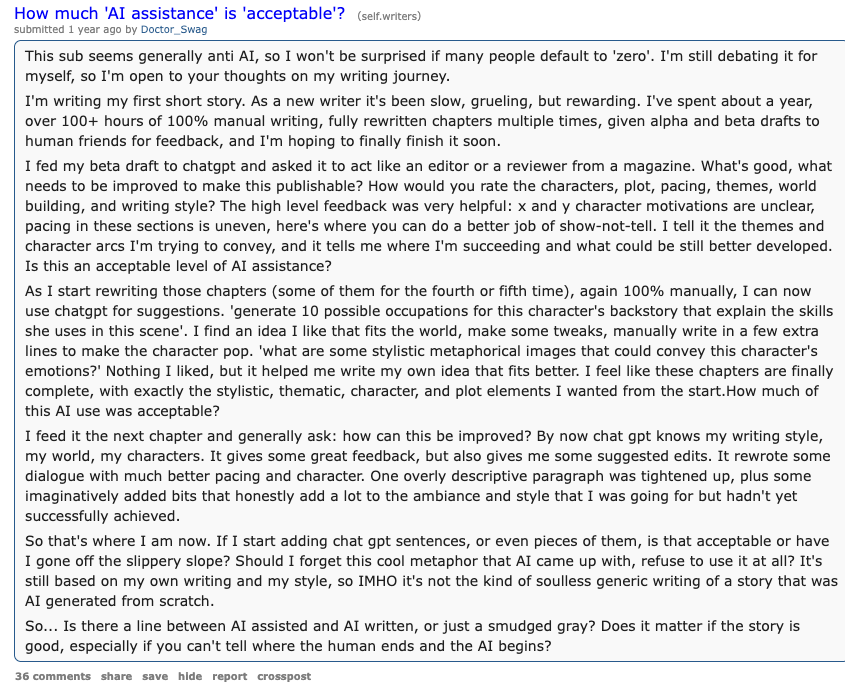
KU's writing-assignment guidance uses a helpful idea: AI use sits on a continuum. It can help with ideation, structure, feedback, summarization, and formatting, but the acceptable level depends on the assignment, workplace, publication, or client expectations.
For general publishing, I would use the same practical rule: if AI helped with wording, that may be fine. If AI supplied facts, arguments, examples, or conclusions, verify them. If a policy requires disclosure, disclose it. If the tool did enough work that you would feel uncomfortable explaining it, that is a warning sign. I do not think every AI-assisted sentence needs a disclosure note attached to it, but the writer should be able to describe the process plainly.
The WritingTools.ai guide to responsible AI writing goes deeper on those boundaries.
How to get better results from an AI writing assistant
Better prompts are not about using fancy wording. They are about giving the assistant the same context you would give a human editor. When a prompt fails, I usually look for missing context before I blame the model.
Include these details when they matter:
- Reader: who the text is for.
- Goal: what the text should accomplish.
- Source material: notes, facts, examples, quotes, or constraints.
- Tone: direct, warm, academic, plain English, persuasive, casual, technical.
- Format: email, intro, outline, comparison table, summary, checklist.
- Boundaries: what to avoid, what must stay, what level of certainty to use.
- Review criteria: clarity, accuracy, originality, concision, tone, structure.
Here is a stronger reusable prompt:
Act as a writing assistant, not a ghostwriter. I will paste a rough draft. First, identify unclear claims, missing context, repetitive sections, and places where the tone sounds generic. Then suggest specific edits. Do not rewrite the whole piece unless I ask. Preserve my meaning and flag any claims that need fact-checking.
That prompt works because it gives the assistant a role, limits the scope, and asks for feedback before rewriting. I usually get better results from that pattern than from asking the tool to "make this better," which is too broad to be useful.
A simple workflow for using one well
You do not need a complicated system. For most writing, this five-step workflow is enough. The point is not to slow yourself down with process. It is to stop the assistant from making decisions before you have made them.
| Step | What to ask the assistant | Human check |
|---|---|---|
| 1. Clarify the brief | "Turn these notes into a clean outline for this reader and goal." | Does the outline match the real intent? |
| 2. Draft from your material | "Draft this section using only these notes and examples." | Did it add unsupported claims? |
| 3. Improve the structure | "What feels missing, repetitive, or out of order?" | Are the suggestions actually useful? |
| 4. Rewrite locally | "Rewrite this paragraph for clarity without changing meaning." | Did the meaning drift? |
| 5. Final review | "List facts to verify, vague phrases, and sentences that sound generic." | Fix the draft yourself before publishing. |
This is also how you avoid the most common failure: asking for a whole finished article too early. If you use AI section by section, you can keep control of the argument and catch problems before they spread across the entire draft. I have learned to treat the full-draft prompt as something to earn, not the first move.
AI writing assistants and SEO
AI writing assistants can help with SEO, but they do not make content valuable by themselves. This is where a lot of AI content goes wrong: it looks optimized, but it has nothing original to reward the reader for staying.
They can suggest title options, meta descriptions, outlines, related questions, summaries, and internal-link opportunities. They can also help simplify dense explanations and turn a rough article into a clearer answer.
But search performance still depends on whether the page satisfies the reader. Google's guidance on using generative AI content says AI can be useful for research and structure, but scaled pages without added value may violate spam policies. Google's 2026 guidance for generative AI features in Search also says the same foundational SEO practices still matter for AI Overviews and AI Mode.
In practice, that means an AI-assisted article should still have:
- A direct answer near the top.
- Original examples, opinions, testing, or editorial judgment.
- Clear structure that can be scanned and cited.
- Accurate claims with sources where needed.
- Natural internal links that help the reader continue the task.
- A final human edit for accuracy, voice, and usefulness.
If you publish AI-assisted content, do not stop at making it "SEO-friendly." Make it specific. Make it useful. Make it something a reader would trust even if they never knew which tool helped draft it. That is the standard I would use for any serious page.
For publishing workflows, the guide on editing AI-generated articles before publishing is the next step after you understand what the assistant can and cannot do.
How to choose an AI writing assistant
The best tool depends on the kind of writing you do. I would start with the writing bottleneck, not the most impressive feature page.
| Need | Look for |
|---|---|
| Everyday emails and documents | Strong grammar, tone, rewrite, and app integration features. |
| Blog and SEO content | Outlines, summaries, drafts from notes, internal-link support, title options, and editing checks. |
| Academic or research writing | Source organization, citation formatting, summarization, and clear limits around generated claims. |
| Brand or team writing | Style guides, reusable instructions, collaboration, permissions, and review workflows. |
| Voice cleanup | Rewriting, readability, tone controls, and the ability to preserve meaning. |
Before committing to a tool, test it with a real messy draft, not a perfect demo prompt. Ask it to critique, rewrite, summarize, and identify factual risks. A good assistant should improve the draft without taking over the whole thing. If it only shines with a clean prompt and ideal input, that tells you less than you think.
If the output keeps sounding generic, a dedicated AI humanizer may help smooth the language, but do not use any tool as a cosmetic fix for weak substance. A human-sounding sentence still needs a real point behind it.
Final checklist before you trust the output
Before you publish, submit, or send AI-assisted writing, run this quick check:
- Did I provide the key facts, examples, and context, or did the assistant invent them?
- Are all names, dates, statistics, quotes, and claims verified?
- Did the rewrite change the meaning or level of certainty?
- Does the final draft sound like the intended writer or brand?
- Is the text specific enough, or could it appear on any competitor's page?
- Have I removed generic phrases and repeated ideas?
- Does the piece follow the rules of the class, workplace, client, or publication?
- Would I be comfortable explaining exactly how AI helped?
That last question is underrated. I use it as a final gut check. If the answer is no, the tool probably did too much.
Final take
An AI writing assistant is best used as a fast collaborator for thinking, drafting, rewriting, and editing. It can help you move faster, see options, clean up rough language, and spot issues you missed.
But it should not own the message.
You still decide what is true, what matters, what sounds right, and what deserves to be published. In my view, that balance is where AI writing becomes genuinely useful instead of just faster noise.