How To Edit AI-Generated Articles Before Publishing
Use this AI article editing checklist to verify facts, fix structure, remove generic AI phrasing, add evidence, and publish stronger drafts.

AI can give you a complete article draft in minutes. I like that part. It removes the blank-page problem and gives the editor something to react to.
It also creates the trap I see most often: the draft looks finished before it has earned the right to be published.
Most AI-generated articles need the same kind of cleanup. The intro is too broad. The facts are not verified. The structure follows a predictable school-essay pattern. The examples feel invented or generic. The writing sounds fluent, but a few paragraphs do not actually say much.
The answer is not to regenerate the whole article ten times. In my experience, that usually creates ten versions of the same problem. You need a staged editing process.
TL;DR: The AI Article Editing Process
If you only remember one thing, edit AI-generated articles in this order:
- Check the article promise against the reader's search intent.
- Rebuild the outline before polishing sentences.
- Verify claims, citations, tool details, dates, and examples.
- Remove generic AI phrasing and repeated section patterns.
- Add real judgment: examples, screenshots, workflow details, limits, or first-hand notes.
- Polish readability, tone, grammar, and formatting.
- Check originality, internal links, metadata, and final publishing quality.
I would not publish an article from an AI article writer, chat tool, or AI blog automation system until it passes those checks. If the goal is organic traffic, connect the edit to a broader AI SEO tool workflow so optimization does not stop at grammar. One weak editing rule can affect one article. In an automated workflow, the same weak rule can affect hundreds.
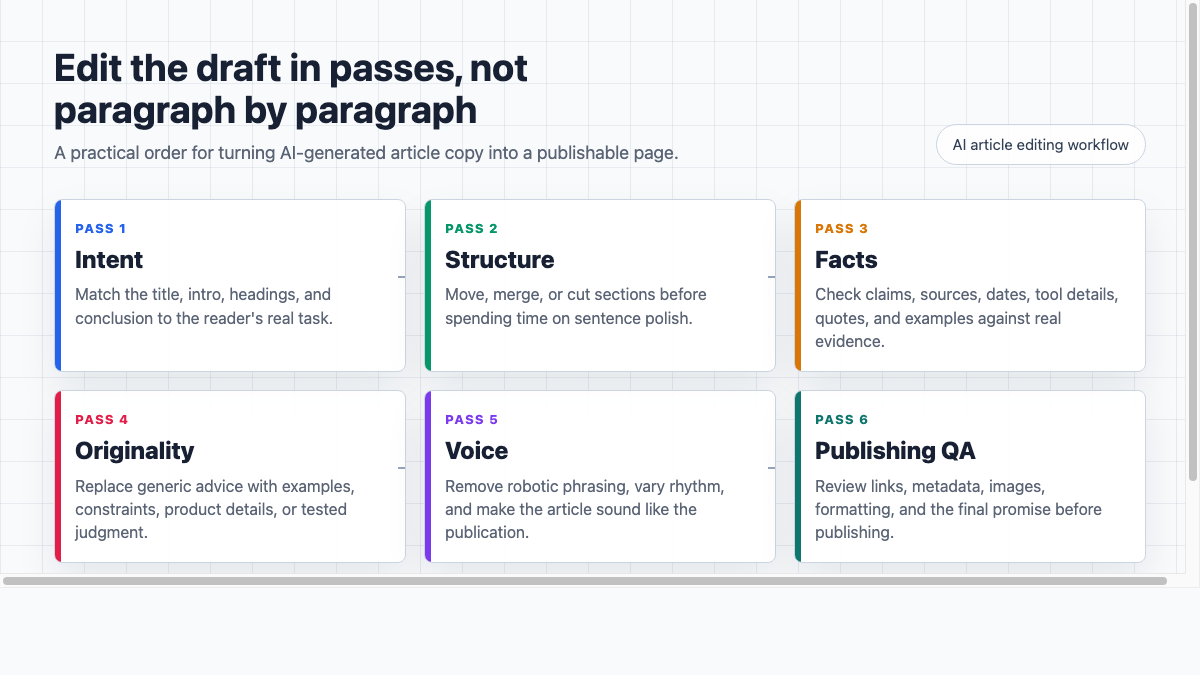
The Fast Answer: Treat AI Output Like A Draft, Not Copy
AI-generated articles are useful because they speed up the first draft. They are risky because they often hide weak thinking behind clean grammar.
Google's guidance is also more practical than most people assume: using generative AI is not automatically against Search guidelines, but content still needs to be helpful, original, and made for people rather than produced mainly to manipulate rankings. Google also warns that scaled content created without added value can violate its spam policies, regardless of whether it was made by AI or a person. Google's guidance on AI-generated content and its scaled content abuse policy are worth reading if you publish AI-assisted articles at scale.
So the editing question is not "Can readers tell this was written by AI?" That question gets too much attention and still misses the real publishing risk.
The better question is:
Would this article still be useful, accurate, and defensible if someone asked how it was made?
That standard changes how you edit. It pushes the work away from cosmetic cleanup and toward editorial accountability.
| Editing pass | What you are checking | What usually needs fixing |
|---|---|---|
| Intent | Does the article answer the title? | Off-topic definitions, weak intro, wrong reader stage |
| Structure | Does the article flow in a useful order? | Repeated H2s, missing steps, generic conclusions |
| Accuracy | Are important claims true? | Hallucinated stats, outdated tool details, fake citations |
| Originality | Does the piece add anything new? | Generic examples, copied structure, commodity advice |
| Voice | Does it sound like your site? | Robotic rhythm, stiff transitions, flat tone |
| Publishing | Is it ready for search and readers? | Weak links, missing metadata, broken sources, thin final checklist |
Step 1: Check The Article Promise Before Editing Sentences
Before touching grammar, compare four things:
- the title
- the introduction
- the H2 headings
- the conclusion
They should all point to the same reader promise.
For this topic, the reader wants to know how to edit AI-generated articles before publishing. They do not need a long history of AI writing. They do not need a generic explanation of what AI is. They need a practical review sequence that helps them avoid publishing weak, inaccurate, or obviously machine-shaped content.
If the draft misses the promise, fix the structure first. Sentence polish cannot save a page that answers the wrong question.
I usually ask:
- What job did the reader come here to do?
- What would they need to check before they feel safe publishing?
- Which sections are only here because AI generated a standard outline?
- Which section would I remove if the article had to be 30% shorter?
That last question is useful because AI drafts often include sections that sound reasonable but do not move the article forward.
Step 2: Read Once Without Editing
This feels slow, but it saves time.
Read the whole draft once without rewriting it. Mark problems, but do not fix them yet.
During this first read, look for:
- sudden topic jumps
- repeated points
- claims that need verification
- paragraphs that sound polished but vague
- examples that could apply to any company
- headings that do not build on each other
The goal is to understand the shape of the draft. If you start line-editing too early, you may spend 20 minutes polishing a section that should be cut.
For long drafts, use a summarizer to create a quick working brief. The useful output is not a generic summary. It should show the argument, main claims, missing support, and sections that repeat each other.
Step 3: Rebuild The Outline Around The Reader's Task
AI drafts often use a predictable structure:
- broad definition
- why the topic matters
- benefits
- best practices
- conclusion
That outline is not always wrong, but it often delays the useful answer. Treat it as a warning sign rather than a finished structure.
For a publishing checklist, the better order is usually:
- direct answer
- editing sequence
- risks to check
- examples of weak vs improved copy
- final publishing QA
Read only the H2s. If the headings do not tell a useful story by themselves, rewrite them before editing the body. This is one of the fastest tests I know for spotting a draft that sounds organized but is not actually helpful.
Weak AI-style headings:
- "Understanding AI-Generated Content"
- "The Importance Of Editing"
- "Leveraging AI For Better Results"
- "The Future Of AI Content"
Stronger headings:
- "Verify Every Claim Before You Polish"
- "Cut The Phrases That Make AI Content Sound Generic"
- "Add Proof That A Human Reviewed The Draft"
- "Run A Final Publishing QA Checklist"
Good headings should help a skimming reader decide where to stop.
Step 4: Verify Facts, Sources, And Tool Details
AI can write with confidence even when it is wrong. That is the biggest publishing risk.
Highlight anything that includes:
- numbers, percentages, or rankings
- dates or recent trends
- tool features or pricing
- legal, medical, financial, safety, or compliance advice
- quotes, citations, or named sources
- claims about Google, SEO, AI Search, plagiarism, copyright, or detectors
Then verify each one against a source you would be comfortable defending. I would rather cut a shaky claim than dress it up with cautious wording and hope nobody notices.
For SEO-related articles, I prefer official sources where possible. Google's guidance on using generative AI content says generative AI can help with research and structure, but mass-producing pages without adding value may violate spam policies. Google's 2026 guide to optimizing for generative AI features in Search also warns against creating lots of query-variant pages mainly to manipulate generative AI responses.
That matters because AI editing is not only about making text sound human. It is about proving the article deserves to exist. For search content especially, fluency does not count as evidence.
If a claim cannot be verified quickly, use one of three fixes:
| Problem | Better edit |
|---|---|
| The claim is important and true | Add a source or explain the evidence |
| The claim is plausible but not proven | Soften it and remove false precision |
| The claim is unnecessary | Cut it |
Accuracy checks need their own process because the most dangerous AI mistakes are often specific: a wrong date, a real source attached to the wrong claim, or a tool feature that no longer exists. A focused workflow for verifying AI writing accuracy helps separate drafting from source review, so AI can shape the sentence without becoming the source of truth.
Step 5: Remove Generic AI Phrasing
AI drafts often contain phrases that are technically correct but editorially empty.
Common examples:
- "In today's fast-paced digital landscape"
- "X is more important than ever"
- "By leveraging Y, businesses can unlock Z"
- "This comprehensive guide will explore"
- "It is crucial to note"
- "Not only X, but also Y"
Do not replace these with louder writing. Replace them with a specific point.
| AI-style draft | Better edit |
|---|---|
| "In today's fast-paced digital world, AI content is becoming increasingly important." | "AI drafts are fast, but speed does not remove the need for fact-checking, structure, and voice." |
| "By leveraging AI, marketers can unlock greater productivity." | "AI saves time on first drafts. Editors still need to decide what is true, useful, and worth publishing." |
| "It is crucial to maintain authenticity." | "Add something the model could not know: a customer objection, a product detail, a tested workflow, or a limitation from your own experience." |
When a paragraph sounds generic, ask what the reader can actually do with it. If the answer is "nothing," rewrite or cut it. My bias is to cut first; a shorter useful article beats a longer draft padded with polite abstractions.
Step 6: Add Proof Of Work
This is where most AI articles become publishable. It is also where weak drafts become uncomfortable, because the editor has to add something the model did not already know.
Add details that show a real person reviewed the draft:
- a specific example
- a before-and-after rewrite
- a screenshot or workflow detail
- a short limitation
- a source-backed claim
- a practical decision rule
- a note about when the advice does not apply
For example, a generic AI paragraph might say:
"Make sure your content aligns with your audience's needs and expectations."
That is not wrong, but it is too broad.
A better edited version would be:
"If the audience is a solo blogger, do not turn the article into an enterprise content governance guide. If the audience is a content team, include review ownership, fact-checking rules, and approval stages."
The second version gives the reader a distinction they can use.
This is also where the editor should add subject matter expertise. AI can summarize common advice. It cannot reliably know what your customers ask, what your product actually does, what your team has tested, or which mistakes keep showing up in your niche. When I edit AI-assisted drafts, this is the pass that most often separates "acceptable" from worth publishing.
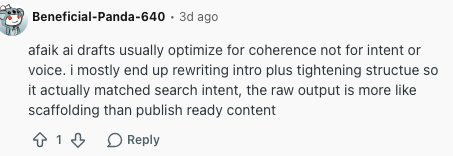
The same problem appears in everyday publishing workflows: raw AI output may be coherent, but it still needs intent, structure, and voice decisions before it is useful.
Step 7: Fix Repetition And Sentence Rhythm
AI writing often repeats the same idea in slightly different forms. It also tends to overuse balanced sentence structures, long setup phrases, and similar paragraph lengths.
Look for:
- three bullets that say almost the same thing
- paragraphs that start the same way
- repeated verbs such as "enhance," "leverage," "ensure," and "utilize"
- long sentences that can be split
- transitions that explain the obvious
Good editing creates rhythm. Some sentences should be short. Some paragraphs should be only one or two lines. Dense ideas need breathing room.
I do this pass out loud when the draft feels suspiciously smooth. If I cannot read a paragraph naturally, readers probably will not move through it naturally either.
A sentence shortener can help with tangled sentences, but use it carefully. Shorter is not automatically better. The point is clarity, not chopping every sentence into the same rhythm.
When the wording is clunky but the meaning is right, a paraphrasing tool can produce options. I would use it for a paragraph or transition, not for the whole article. Whole-article paraphrasing often preserves the same weak structure under different wording.
Step 8: Match The Voice To The Publication
A publishable AI-assisted article should sound like it belongs on your site.
Check:
- formality level
- vocabulary
- sentence length
- opinion strength
- examples
- calls to action
- product mentions
If your site is practical and direct, remove academic filler. If your brand is more expert-led, add sharper judgment. If the article is for beginners, define terms earlier and use simpler examples. Personally, I would rather make one clear editorial choice than keep the voice neutral enough to fit any website.
A text tone analyzer can help spot whether a draft reads too formal, too casual, or inconsistent across sections. The final call still belongs to the editor.
If the article still sounds robotic after you fix structure and facts, use a focused process for humanizing AI-generated text. The goal is not to trick detectors. The goal is to restore specificity, rhythm, and point of view.
Step 9: Check Originality, Plagiarism, And Attribution
AI-generated articles can accidentally echo common phrasing, source structures, or copied text from the prompt material.
Before publishing:
- run a plagiarism check if the draft used source material
- verify that quotes are real and attributed correctly
- cite sources for claims that need support
- remove fake citations
- do not publish copied competitor structure with light rewording
- check whether images, screenshots, or examples are allowed to be used
If the article includes citations, use a citation generator only as a formatting helper. The source still needs to be real, relevant, and reviewed.
AI detectors are less useful than many people think. They can create false positives and false confidence. I treat them as a weak signal at best, not a publishing decision. The stronger question is whether the draft is original, accurate, and genuinely edited. This article on AI writing and plagiarism explains the difference more clearly than treating detector scores as the final answer.
Step 10: Use Tools For Cleanup, Not Judgment
Editing tools are helpful when they have a narrow job.
| Tool | Good use | Bad use |
|---|---|---|
| Grammar checker | Catch spelling, punctuation, and basic grammar issues | Decide whether the article is strategically useful |
| Readability improver | Simplify dense passages | Flatten every sentence into the same tone |
| Passive to active voice converter | Fix unclear or heavy passive constructions | Remove passive voice when it is actually natural |
| AI humanizer | Improve stiff wording after facts are verified | Hide weak research or copied structure |
Use tools after you know what the article should say. If you use them before the argument is clear, they will polish the wrong draft. That is the mistake I see when teams try to automate editing too early: the tool improves sentence quality while the article's actual point stays weak.
Step 11: Add Internal Links Where They Actually Help
Internal links should help readers continue the task they are already doing.
Do not place five links in a "helpful resources" paragraph just because the site has related pages. I am fairly strict about this because forced links make otherwise decent articles feel assembled instead of edited.
Add links where they answer the next likely question. For example, if the article explains fact-checking, a link about accuracy belongs there. If the article explains voice cleanup, a link about humanizing AI text belongs there. If the article discusses student writing, editing an AI-generated essay is a different use case and should not interrupt a business publishing checklist.
Every linked sentence should still make sense if the link is removed. If the sentence only exists to carry the link, rewrite the point first.
For a more structured publishing pass, use this AI content optimization checklist after the editorial edit but before the page goes live.
Step 12: Prepare The Article For AI Search And Regular Search
AI Search does not mean stuffing the page with every possible question variation.
Google's AI Search guidance says the same SEO fundamentals still apply: create useful, unique content for people, make pages accessible, and avoid overdoing query-variant content just to appear in generative responses.
For an AI-assisted article, this means:
- answer the main question early
- use clear headings that describe the task
- include concise definitions where needed
- add examples, tables, and checklists that are easy to summarize
- cite official or primary sources for important claims
- avoid thin sections made only to target another keyword
- keep authorial judgment visible
The final search snippet also deserves a human pass. A meta description generator can create options quickly, but choose the version that accurately reflects the finished article.
This is one reason an early TL;DR helps. It gives readers and answer systems a compact summary of the process, while the rest of the article proves the advice. It is not a shortcut for depth; it is a promise the rest of the page has to earn.
Final AI Article Editing Checklist
Before publishing, make sure the draft passes this checklist:
- The title matches the article's actual promise.
- The intro reaches the answer quickly.
- The article satisfies the reader's search intent.
- The headings follow a logical order.
- Generic AI sections are removed or rewritten.
- Repeated points are merged.
- Important claims are verified.
- Fake or weak citations are removed.
- Examples are specific and useful.
- The article includes proof of human review.
- Tone matches the publication.
- Grammar, punctuation, and formatting are clean.
- Internal links are natural and not duplicated.
- External sources support important claims.
- Metadata matches the final article.
- The conclusion gives a clear publishing standard.
If the draft fails several of these checks, do not keep polishing. Go back to the outline, fix the article's shape, and then edit the language. Polishing a broken structure is one of the easiest ways to waste an editing session.
When To Send The Draft Back To AI
Sometimes manual editing is the wrong first move.
Send the draft back to AI when:
- the structure is mostly right, but one section needs more options
- you need alternate headlines or transitions
- a paragraph is too long and you want shorter versions
- you need a checklist, table, or summary from already verified notes
Do not send it back to AI when:
- the facts are unverified
- the article has no clear angle
- the examples are fake
- the source material is thin
- the draft needs expert judgment
In those cases, the editor needs to solve the problem first. AI can help rewrite a decision, but it cannot make the decision for you. I use AI as a drafting partner, not as the person responsible for what gets published.
Final Advice
AI can speed up drafting. It cannot replace publishing judgment.
The strongest workflow is simple: draft, read, restructure, verify, humanize, polish, and run a final QA pass. It is not glamorous, but it works.
That process takes longer than clicking publish, but it protects the article from the problems readers notice fastest: vague advice, incorrect claims, repeated sections, and a voice that sounds like it came from everywhere and nowhere.
If the final article is accurate, useful, specific, and easy to defend, AI was a good drafting assistant. If not, it is still just a draft, no matter how finished it looks.