Write With AI Without Sounding Like Everyone Else
Use AI for drafts, structure, and editing without losing your voice. A practical workflow for prompts, raw notes, humanizing, and final revision.

I can usually tell when a draft was handed over to AI in the first two lines.
Not because AI is bad at writing. It is often clean, fluent, and fast. That is exactly why the problem is easy to miss. The draft looks finished before it has earned the right to be finished.
The real giveaway is the voice. Everything sounds smoothed down. Safe. A little too balanced. The writer seems to have an opinion, then backs away from it. The paragraphs line up at the same length. The examples feel like examples anyone could have invented in 12 seconds.
That is how you end up sounding like everyone else.
Writing with AI without losing your voice is not mainly a prompt trick. It is a workflow problem. You need to give the tool raw material, useful constraints, and a real editing pass where your judgment comes back onto the page.
TL;DR
| Step | What to do | Why it works |
|---|---|---|
| 1. Start with your own point | Write the audience, the real problem, and the thing you believe before asking AI for anything. | AI needs direction that cannot be copied from a generic topic prompt. |
| 2. Feed it raw material | Use notes, voice memos, customer questions, rough drafts, examples, or opinions. | Your inputs are the part nobody else has. |
| 3. Add taste constraints | Tell AI what to avoid: cliches, corporate wording, fake balance, repeated sentence shapes, and motivational endings. | This blocks the default "polished internet voice." |
| 4. Edit in passes | First cut fluff, then add specificity, then fix rhythm. | Most AI writing becomes human in revision, not generation. |
| 5. Use tools carefully | Use assistants, humanizers, tone checks, and paraphrasers to improve drafts you already shaped. | Tools should preserve your thinking, not replace it. |
My short version: use AI for speed, options, structure, and cleanup. Keep the thinking, taste, examples, and final edit for yourself.
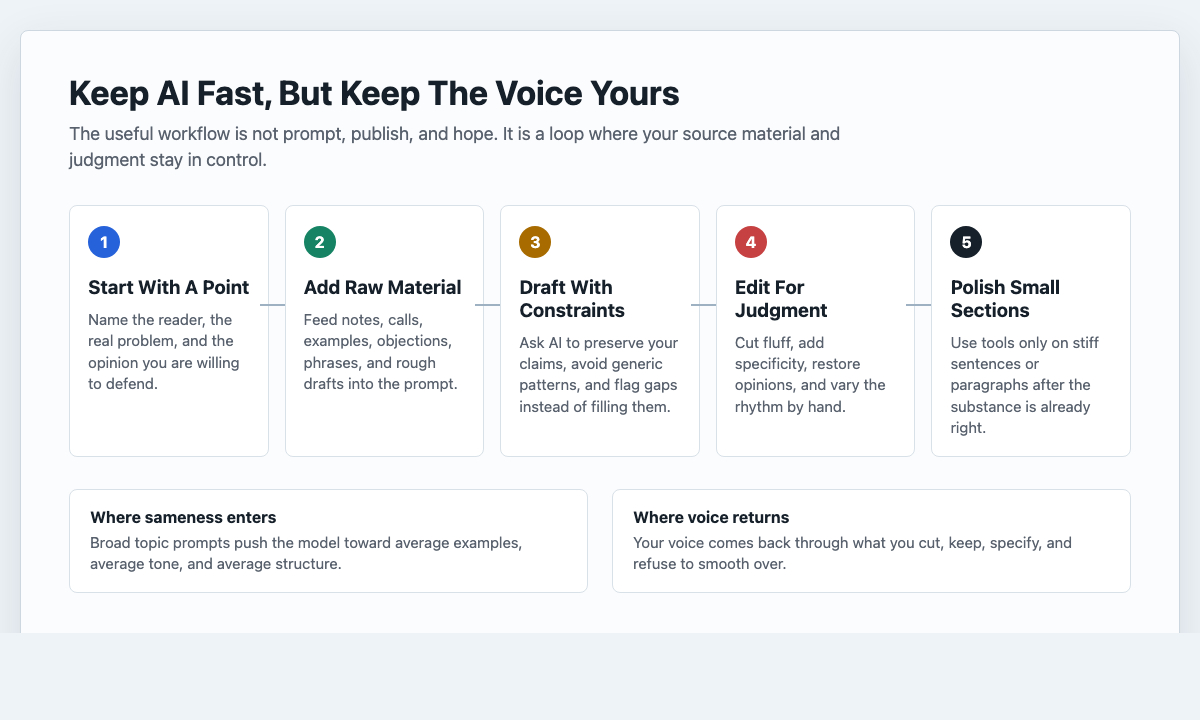
Why AI Writing Starts To Sound The Same
Most people prompt AI the same way:
Write a blog post about X. Make it engaging. Use a friendly tone. Add headings and bullet points.
That prompt looks harmless. I have used versions of it myself when I just wanted a quick starting point. The trouble is that it gives the model permission to choose the average version of everything: average angle, average intro, average examples, average rhythm.
The result is the universal AI accent:
- broad claims without enough proof
- sections that explain the obvious before saying anything useful
- padded transitions like "moreover" and "it is important to note"
- repeated sentence structures
- fake balance where the article refuses to take a clear position
- endings that sound like a motivational poster
Stanford HAI's 2026 AI Index reports that generative AI reached 53% population adoption within three years and that organizational adoption reached 88%. That matters for writers because the reader has now seen a lot of AI-assisted prose. Clean text is no longer enough. If your article sounds like the default output from the same tools everyone else uses, readers have less reason to remember it.
The fix is not to stop using AI. The fix is to stop letting the model choose the defaults.
Treat AI Like An Assistant, Not The Author
If you treat AI like the author, you get the internet's average voice.
If you treat it like a fast assistant, you get leverage. In my own workflow, AI is strongest when the job is narrow: brainstorm angles, organize notes, shorten a messy section, suggest alternatives, summarize research, or point out weak transitions. But you still decide what the article means.
That distinction sounds small. It changes the whole draft.
When AI is the author, you ask:
Can you write this for me?
When AI is the assistant, you ask:
Here is my point, my audience, my rough evidence, and the tone I want. Help me turn this into a clearer draft without replacing my opinions.
That second version gives the model a job. It is not there to invent your voice. It is there to help you express it faster.
An AI writing assistant is useful when you keep that relationship clear. Use it to ask better questions, draft from your notes, tighten sections, and create variations. Do not use it as a one-click substitute for deciding what you actually think.
Start With Something Real Before You Prompt
Before I ask AI to draft, I like to write three plain lines:
- Who am I talking to?
- What do they think they want?
- What do they actually need to hear?
For this article, that might look like this:
- Reader: someone using AI for content but worried the output sounds bland
- They think they want: a better prompt
- They actually need: a repeatable editing process and a way to protect their voice
Now the article has a spine. AI can still help, but it is no longer pulling the topic from generic internet mush.
This is especially important for blog posts, essays, newsletters, and social posts where the reader is not only looking for information. They are looking for a point of view. If your first input is only a topic, the model has to invent the point of view. That is where sameness creeps in.
Give AI Raw Material Nobody Else Has
The fastest way to avoid generic AI writing is to give the model inputs that cannot be copied from someone else's prompt.
Useful raw material includes:
- messy notes from your own experience
- a voice memo transcript
- a rough first draft
- customer questions
- screenshots of comments, objections, or support tickets
- a list of phrases you naturally use
- examples of writing you liked and disliked
- one opinion you are willing to stand behind
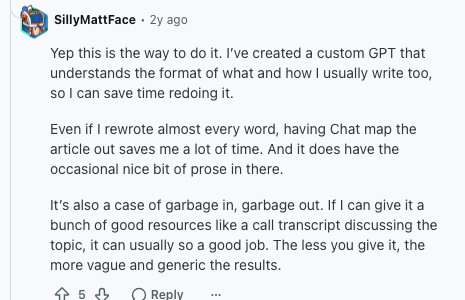
Then prompt the model like this:
Use my notes as the source. Keep my opinions. Do not add new claims. Improve structure, clarity, and flow only. If a section is thin, ask me for more detail instead of inventing examples.
That last sentence matters. AI is good at making thin sections look complete. It can turn "say something about editing" into 400 words of smooth nothing. Your job is to make the missing substance visible before the draft gets too polished.
If you already have a rough draft, a paraphrasing tool can help you test alternate phrasing, but I would only use it on specific sentences or paragraphs. Whole-article paraphrasing is usually how personality gets flattened.
Use A Voice Sheet Instead Of A Giant Prompt
You do not need a 900-word mega prompt every time you write. You need a small voice sheet you can reuse.
Keep it to 8 to 12 lines. For example:
- I write in short paragraphs.
- I prefer direct openings.
- I do not use corporate phrases like "unlock," "leverage," "delve," or "elevate."
- I use examples before abstract explanations.
- I am allowed to be slightly opinionated.
- I avoid fake hype.
- I would rather cut a transition than add a weak one.
- I end with a practical takeaway, not a speech.
That is enough.
Paste the voice sheet above your prompt and ask the model to follow it. Over time, refine it based on the edits you keep making by hand. This is where the voice sheet gets useful: it turns your recurring edits into instructions. If you always delete a phrase, add it to the avoid list. If you keep restoring shorter paragraphs, tell the model to write shorter paragraphs from the start.
This is also where a text tone analyzer can help. Not because it knows your voice better than you do, but because it can give you a quick read on whether a draft is coming across as stiff, formal, urgent, warm, vague, or too promotional.
The Prompt I Would Actually Use
Here is a practical base prompt:
You are my writing assistant, not the author. Before drafting, ask me 5 short questions about the reader, the point of view, the example, the tone, and what I want to avoid.
After I answer, write a draft that:
- uses my answers as the source
- avoids cliches, corporate phrases, and generic advice
- includes at least one specific example from my notes
- takes a clear position instead of balancing every sentence
- varies sentence length and paragraph length
- keeps my phrasing when it is clear
- flags missing evidence instead of inventing it
- ends with a practical takeaway
The best part of this prompt is not the wording. It is the interview step.
When AI asks you questions first, you are forced to think before the draft exists. I find this especially useful when I am tired, rushed, or tempted to accept the first clean answer. The interview step slows the process just enough to stop a polished draft from pretending it already has a point.
Once this basic workflow feels natural, build a small library of AI writing assistant prompts for recurring jobs: outlining, tightening, tone-checking, summarizing notes, and rewriting awkward paragraphs. Prompts work best when they support your judgment, not when they try to replace it.
Run A Voice Audit Before You Edit
Before rewriting anything, scan the draft for the patterns that make AI-assisted writing feel generic.
| Pattern | What it sounds like | Better fix |
|---|---|---|
| Vague benefit claims | "AI can enhance productivity and streamline content creation." | Say what task it speeds up and what still needs human review. |
| Fake sophistication | "This is not just a tool, it is a strategic partner." | Make a direct claim: "Use it for outlines and revision, not for final judgment." |
| Repeated rhythm | Every sentence lands at the same length. | Mix short sentences, longer explanations, and occasional fragments. |
| Polite hedging | "It may be beneficial to consider..." | Say the actual point: "Do this before you publish." |
| Empty transitions | "Moreover," "Furthermore," "In conclusion" | Cut the transition or replace it with a specific turn. |
| Generic examples | "For example, a business can..." | Use a real task, channel, product, audience, or constraint. |
One competitor article I reviewed focused heavily on a single AI tell: the "not just X, but Y" structure. That is a good catch. It appears everywhere because it gives a sentence the illusion of depth. But it is only one pattern. A stronger audit looks at rhythm, specificity, stance, and structure too.
The Three-Pass Edit That Makes AI Writing Sound Human
Prompting helps. Editing matters more.
I use three passes because trying to fix everything at once usually turns into aimless polishing.
Pass 1: Cut The Fluff
Search for phrases like:
- it is important to note
- in today's fast-paced world
- moreover
- additionally
- overall
- can help you
- comprehensive guide
- let's dive in
Do not replace all of them. Delete most of them.
If a sentence only tells the reader that the next section is useful, cut it. If a paragraph repeats the heading in softer words, cut it. If the draft says "AI can streamline your workflow" but never names the workflow, either make it specific or remove it.
This is the easiest pass, and it usually improves the draft immediately. I am fairly ruthless here because readers rarely miss the soft setup sentence you were nervous to delete.
Pass 2: Add Your Judgment Back In
Now add the parts AI cannot responsibly invent:
- a specific example
- a personal rule
- a small opinion
- a useful caveat
- a mistake you have actually seen
- a detail from a real audience, client, product, or draft
For example, this sentence is technically fine:
Consistency is important for content creation.
I would rather write:
I once posted every weekday for a month and watched the traffic barely move. The useful part was not reach. It was that I stopped treating every intro like a life decision.
That version is not universally "better" for every brand. But it has a human fingerprint. It gives the reader something to remember, and that is usually worth more than another perfectly balanced sentence.
Pass 3: Fix The Rhythm
AI likes smoothness. Human writing has more shape.
In the rhythm pass, I look for:
- three paragraphs in a row with the same length
- sentences that all start the same way
- transitions that make the draft feel over-explained
- places where a short sentence would land harder
- places where a longer sentence would carry nuance
Sometimes I add a fragment.
Sometimes I remove a transition completely.
Sometimes I keep a line that is slightly imperfect because it sounds like the writer. That is allowed. Not every sentence needs to look like it survived a committee.
Humanizers Help Only After The Substance Is Fixed
AI humanizers can be useful, but they are not magic.
The wrong way to use one is to paste a generic AI draft into a humanizer and hope it comes out sounding original. I have tested that approach enough to distrust it. It usually creates a different flavor of generic, and sometimes it changes meaning, weakens examples, or adds strange phrasing.
The better use case is narrower:
- You already know the point of the piece.
- You have edited the claims, structure, and examples.
- A few paragraphs still sound stiff.
- You want alternate wording without changing the substance.
That is where an AI humanizer can help. Run a paragraph, compare the versions, and keep only the changes that improve clarity or rhythm. If the tool changes your point, undo it.
The deeper process of humanizing AI text starts after the draft already has substance. Humanizing should be the final polish, not a disguise for a thin article.
This matters for search too. Google's guidance on using generative AI content is not "AI is bad." The practical standard is whether the content is helpful, reliable, and made for people. Google's spam policies also warn against automated paraphrasing or obfuscation at scale. In plain English: do not use a humanizer to hide low-value content.
Make The Article Easier For AI Search To Summarize
If you want an article to show up in AI-assisted search experiences, do not make the page mysterious. I do not think this requires a separate mystical writing style. Make the page useful, structured, and easy to extract.
Google's guide to optimizing for generative AI features says the core work is still foundational SEO: create unique, valuable content, make it crawlable, and provide information that helps users. For this topic, that means the article should give clear definitions, concrete steps, examples, and a concise takeaway near the top.
Practical ways to do that:
- answer the main question early
- use a TL;DR or takeaway section
- include a workflow table
- name the patterns that make AI writing feel generic
- provide before-and-after examples
- explain when tools help and when they hurt
- avoid burying the actual advice below a long trend intro
AI search systems and human readers both reward clarity. A page that is easy to summarize is usually easier to read.
Before And After: A Generic AI Sentence
Here is the kind of sentence I see constantly:
Leveraging AI tools can significantly enhance your productivity by streamlining your content creation workflow.
There is nothing technically wrong with it. That is the problem. It is too clean to be useful.
I would rewrite it like this:
AI can save you a stupid amount of time. But only if you stop asking it to write like a brochure.
Same basic idea. Different energy.
Or, for a quieter brand:
AI helps most when you give it a messy draft and a clear job. It struggles when you ask it to invent the point of view for you.
That version is less punchy, but still specific. The goal is not to make every sentence edgy. The goal is to make the sentence sound chosen.
Where WritingTools.ai Fits Without Making Everything Templated
Templates are useful. They also create sameness when you follow them blindly.
The trick is to use tools for the parts where speed and variation help:
- generating alternate openings
- shortening long sentences
- checking tone
- rewriting a stiff paragraph
- turning notes into a first structure
- polishing an email, post, or outline
For example, if your outreach emails always start with the same "Hope you're doing well" line, an AI email generator can give you options quickly. I would ask for more options than I need, then keep maybe one line and rewrite the rest. The human part is choosing the version that fits the relationship, then changing it until it sounds like something you would actually send.
If a sentence is too long, a sentence shortener can give you cleaner versions. If a paragraph reads correctly but feels flat, a readability improver can show where the language is getting dense. Use these tools as editors, not ghostwriters.
The same principle applies to social content. If you want to use AI for faster social posts without losing your tone, the process is still raw material first, draft second, human edit last. Short formats make the problem more obvious because generic phrasing has nowhere to hide.
A Publish Checklist For AI-Assisted Writing
Before you publish, run this checklist:
- Does the first paragraph sound like something you would actually say?
- Is there one specific example that could not have come from a generic prompt?
- Did you remove "guide language" that only announces the article?
- Did you take at least one clear position?
- Are the paragraphs varied enough to feel alive?
- Did you check facts, names, links, and claims?
- Did you edit at least once after the first AI output?
- Would the article still be useful if every internal link disappeared?
- Did a tool improve your voice, or did it overwrite it?
That last question is the one I care about most.
AI should make the draft easier to finish. It should not make the writing harder to recognize.
The Simple Workflow
If you want one workflow, use this:
- Write your point in three lines.
- Add raw notes, examples, and opinions.
- Ask AI to interview you before drafting.
- Generate a draft from your material.
- Cut filler.
- Add specificity and judgment.
- Fix rhythm.
- Use a humanizer, tone analyzer, or rewriting tool only for small sections that still feel stiff.
- Read the opening and ending out loud.
- Publish only when the article sounds like a person with a point of view.
Writing with AI without sounding like everyone else is mostly about refusing the first smooth answer.
The first output is clay. Useful clay, sometimes. But still clay.
Your voice comes back in the choices: what you cut, what you keep, where you add a real example, and when you decide the polished sentence is not the true one. That is the part I would protect most.